
Embark on a journey with Wireless Home Automation Systems, where convenience meets innovation to elevate your living experience. From seamless integration to enhanced aesthetics, discover the endless possibilities that await you in this modern era of smart technology.
Unveil the wonders of wireless automation systems that redefine the way you interact with your home, promising a lifestyle of comfort and efficiency like never before.
Introduction to Wireless Home Automation Systems
Wireless home automation systems are innovative technologies that allow homeowners to control and monitor various devices and systems within their homes remotely. These systems utilize wireless communication protocols to connect devices and sensors, enabling seamless automation and smart functionalities.
Benefits of Using Wireless Technology in Home Automation
- Flexibility: Wireless systems offer the flexibility to add or relocate devices without the need for complex wiring, making it easier to customize and expand the automation setup.
- Convenience: With wireless technology, homeowners can control their smart devices from anywhere using smartphones or tablets, enhancing convenience and accessibility.
- Scalability: Wireless systems can easily scale to accommodate additional devices and functionalities, allowing for gradual expansion as needed.
- Cost-effective: The installation of wireless home automation systems is often more cost-effective compared to wired systems, as it reduces the labor and materials required for wiring.
How Wireless Systems Differ from Wired Systems
- Installation: Wireless systems do not require extensive wiring, making installation quicker and less invasive compared to wired systems.
- Portability: Wireless devices can be easily moved or repositioned within the home without the constraints of physical connections, providing greater flexibility.
- Reliability: While wired systems may offer more stable connections in some cases, advancements in wireless technology have significantly improved reliability, making wireless systems a viable option for home automation.
- Interference: Wireless systems may be susceptible to interference from other electronic devices or environmental factors, but proper setup and configuration can mitigate these issues effectively.
Components of a Wireless Home Automation System
When setting up a wireless home automation system, there are several key components that play vital roles in ensuring seamless operation and control of smart devices within your home.
Smart Hubs
Smart hubs act as the central control unit of a home automation system, allowing different smart devices to communicate with each other. They serve as the bridge between your smartphone or tablet and the various sensors and smart devices installed in your home.
Sensors
Sensors are essential components that detect changes in the environment or specific conditions within your home. These can include motion sensors, light sensors, temperature sensors, and more. They trigger actions in response to detected changes, such as turning on lights when motion is detected.
Smart Devices
Smart devices are the end-points of a home automation system, such as smart lights, smart thermostats, smart locks, and smart cameras. These devices can be controlled remotely through a smartphone or set to perform automated tasks based on pre-defined schedules or triggers.
Installation and Setup
When it comes to installing and setting up a wireless home automation system, it’s essential to follow a step-by-step guide to ensure everything works smoothly. Common challenges may arise during the setup process, but with the right troubleshooting techniques, you can overcome them. Additionally, optimizing the placement of devices is crucial for better connectivity and overall system performance.
Step-by-Step Guide for Installation
- Start by choosing a central location for your hub or controller, ensuring it is within range of all devices.
- Follow the manufacturer’s instructions to connect the hub to your Wi-Fi network.
- Pair each smart device with the hub according to the specific instructions provided.
- Install and set up mobile applications for remote control and monitoring of your home automation system.
- Test the system to ensure all devices are communicating properly and responding to commands.
Common Challenges and Troubleshooting
- If devices are not pairing or connecting to the hub, try resetting them and following the pairing process again.
- Poor connectivity or range issues can be addressed by moving the hub to a more central location or adding Wi-Fi extenders.
- If the mobile app is not working correctly, try reinstalling it or checking for any software updates.
Optimizing Device Placement for Better Connectivity
- Avoid placing devices near metal objects or large appliances that may interfere with the signal.
- Ensure there are no physical obstructions blocking the signal between devices and the hub.
- Consider adding signal boosters or repeaters to extend the range of your wireless home automation system.
Integration with Home Accents
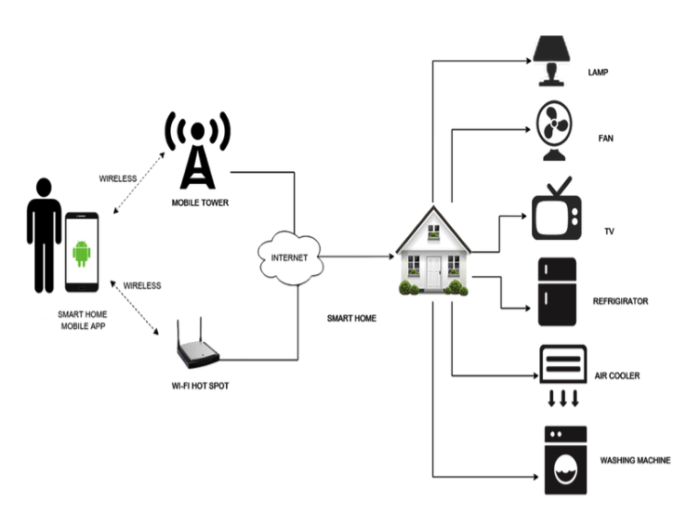
Wireless home automation systems offer the convenience of controlling various home accents such as lighting fixtures, curtains, and decorative items with just a touch of a button or a voice command. This integration not only adds a modern touch to the home but also enhances its functionality and aesthetics.
Impact on Aesthetics
Integrating wireless home automation with home accents can transform the look and feel of a space. For instance, smart lighting systems can create different ambiances for different occasions, from cozy warm lighting for movie nights to bright and energizing lighting for gatherings. Automated curtains can open and close at specific times of the day, adding a touch of sophistication and energy efficiency to the home.
Creative Ideas for Integration
- Install smart lighting fixtures that can be dimmed or change colors to suit different moods or activities.
- Use motorized curtains that can be controlled remotely to let in natural light or provide privacy.
- Incorporate smart decorative items like digital photo frames that display family photos and artwork, which can be updated wirelessly.
- Utilize smart plugs to control the power supply to accent lights or decorative items, allowing for easy customization and scheduling.
Home Makeover with Automation
Wireless home automation systems not only enhance the functionality of a home but also have the power to transform its overall look and feel. By seamlessly integrating smart devices with interior design elements, homeowners can create a space that is both stylish and technologically advanced.
Popular Trends in Combining Automation with Interior Design
- Smart Lighting: Installing smart bulbs or light strips that can be controlled remotely or programmed to change colors can add a modern touch to any room.
- Voice-Activated Assistants: Devices like Amazon Echo or Google Home not only provide convenience but also serve as sleek, futuristic additions to a home.
- Smart Thermostats: Thermostats that learn your preferences and adjust the temperature accordingly not only save energy but also blend in seamlessly with any decor.
Smart Devices as Stylish Home Decor Pieces
- Smart Mirrors: These mirrors not only display the time, weather, and news updates but also function as elegant decor pieces in bathrooms or dressing areas.
- Smart Speakers: Devices like the Sonos One or Apple HomePod not only deliver exceptional sound quality but also come in various stylish designs to complement any room.
- Smart Blinds: Motorized blinds that can be controlled remotely or scheduled to open and close at specific times can add a touch of sophistication to any window.
Setting up a Home Office with Automation
Integrating automation into a home office setup can bring numerous benefits, enhancing productivity, efficiency, and overall work experience. By incorporating smart devices and systems, you can create a connected workspace that caters to your needs and preferences.
Benefits of Home Office Automation
- Remote Access: With automation, you can control office devices and systems remotely, allowing you to manage tasks efficiently even when you are away from your workspace.
- Energy Efficiency: Smart lighting, thermostats, and power outlets can help reduce energy consumption in your home office, leading to cost savings in the long run.
- Enhanced Security: Smart security cameras, sensors, and door locks provide added protection to your home office, ensuring a secure work environment.
Productivity Tips with Home Automation
- Set Up Automated Schedules: Utilize automation to create schedules for tasks, meetings, and breaks, helping you stay organized and on track throughout the workday.
- Voice Control: Implement voice-controlled assistants like Amazon Alexa or Google Assistant to manage office tasks hands-free, enabling seamless workflow and multitasking.
- Smart Notifications: Receive alerts and notifications on your devices for important emails, deadlines, or upcoming meetings, keeping you informed and focused on your work.
Recommended Smart Office Furniture and Gadgets
- Smart Desks: Adjustable standing desks with built-in charging ports and storage compartments can enhance comfort and productivity in your home office.
- Smart Plugs: Use smart plugs to control electrical devices remotely or set schedules for automatic power on/off, optimizing energy usage and convenience.
- Smart Thermostat: Maintain a comfortable temperature in your home office with a smart thermostat that can be controlled via smartphone or voice commands.
Choosing Home Office Furniture
When setting up a home office with a wireless home automation system, choosing the right furniture is crucial for creating a comfortable and productive work environment. Ergonomic office furniture and smart furniture play a significant role in enhancing efficiency and organization, ultimately improving your overall work experience.
Compare Ergonomic Office Furniture Options
- Ergonomic chairs with lumbar support can help reduce back strain and improve posture during long work hours.
- Height-adjustable desks allow you to switch between sitting and standing, promoting better blood circulation and reducing the risk of health issues associated with prolonged sitting.
- Monitor arms and keyboard trays can be adjusted to the optimal height and angle to prevent neck, shoulder, and wrist strain.
Role of Smart Furniture in Enhancing Efficiency
- Smart desks with built-in charging stations and cable management systems help keep your workspace tidy and organized.
- Adjustable smart lighting solutions can be programmed to automatically adjust brightness levels based on natural light conditions, reducing eye strain and improving focus.
- Smart storage solutions with sensors can help track inventory and remind you when supplies are running low, streamlining your workflow.
Tips for Selecting Furniture
- Choose furniture that complements the design and functionality of your wireless home automation system, ensuring a cohesive look and seamless integration.
- Consider the size of your home office space and select furniture that fits comfortably without overcrowding the room.
- Opt for durable and high-quality furniture that can withstand daily use and provide long-term comfort and support.
In conclusion, Wireless Home Automation Systems open up a world of possibilities, blending functionality with style to create a truly smart living environment. Embrace the future of home automation and transform your space into a hub of modern convenience and sophistication.
Questions Often Asked
How do wireless home automation systems enhance security?
Wireless systems provide remote access and real-time alerts, allowing you to monitor your home from anywhere, enhancing overall security.
Can wireless home automation systems be integrated with existing home appliances?
Yes, many wireless systems offer compatibility with various smart plugs and adapters, enabling seamless integration with your current appliances.
Are wireless home automation systems easy to install for beginners?
Most wireless systems come with user-friendly setup guides and intuitive apps, making installation straightforward even for beginners.


